
AI Phone:Call&Voice Translator
AI Phone CallCommunication
4.61.56K Reviews
- Version
- 3.33.0
- Installs
- 1.00M
- Age Rating
- Everyone
Screenshots
Our Review of AI Phone:Call&Voice Translator
 Analysis by Appyee
I can see this being most useful in a household where people share a phone occasionally, or where one person handles calls and another needs help understanding them. AI Phone: Call & Voice Translator is built around communication rather than language study, so its appeal is practical: it may help you get through a conversation when neither person can comfortably switch to a shared language. I would treat it as a tool for making a first attempt at understanding, not as a replacement for a fluent interpreter when the stakes are high.
A shared phone can help, but agree on the boundaries first
Sharing a device is different from sharing an account. Before a family member uses the app, I’d agree on who is making the call, whose contacts or conversation it involves, and whether the other person is comfortable with a translation tool being used. A translated call can include personal details, so it is worth asking before switching the app into a private conversation rather than assuming that everyone is fine with it.
On a shared phone, a simple routine can prevent mix-ups: the person who owns the conversation should stay present, choose the language settings, and confirm the translated meaning aloud when something matters. That is more reliable than handing the phone over and expecting another household member to infer what has been set up. It also keeps the app from becoming an accidental stand-in for someone’s consent or judgment.
Use it for coordination, not as a substitute for careful decisions
A realistic everyday case might be a household arranging a delivery or asking a service provider to call back. One person can lead the exchange while another helps follow the translation, then repeat the important details in plain language: the time, the address, or what action is expected next. That second check is useful because a conversation can feel fluent while still leaving one crucial phrase misunderstood.
I would be more cautious with medical instructions, legal matters, financial decisions, or anything involving safety. In those situations, a translation app can help someone explain the immediate problem, but I would ask for a qualified interpreter or a written confirmation before acting on complex instructions. The convenience is real; so is the cost of treating an imperfect translation as definitive.
Who is likely to get the most from it?
This kind of app makes sense for adults who regularly speak with people across language barriers, including travelers, relatives communicating with a multilingual household, and people who need to make occasional calls in another language. It can also help when a person knows a little of the language but lacks confidence in a live exchange. Having a translation aid nearby may make it easier to start the conversation and ask follow-up questions.
I would skip it if you need a guaranteed professional interpretation, if you mostly want structured language lessons, or if your conversations are already handled comfortably through text. A dedicated learning app is better for building vocabulary over time; a basic text translator may be quicker when you only need to understand a short written message. AI Phone is most compelling when the challenge is speaking and listening in the moment.
What to check before relying on a translated call
Try the app first with a low-stakes conversation, and make sure you understand how to select the languages and move through the call workflow before using it for something important. Speak in short, direct sentences, avoid slang, and pause between ideas. These habits give a translation tool cleaner material to work with and make it easier for both people to notice when a response does not fit the question.
It is also sensible to keep a fallback ready. If either person cannot follow the exchange, switch to a simpler channel, write down names and numbers, or ask the other person to repeat the key point slowly. Translation can reduce friction, but it cannot remove background noise, unclear speech, or the ambiguity that comes with unfamiliar names and local expressions. For coordination, I’d end by restating the agreed next step rather than assuming the call itself settled everything.
For a household, the main question is not whether everyone should use the app in the same way. It is whether the person whose conversation is involved remains in control, understands what is being translated, and can stop or change approach when something feels unclear. That small boundary makes a shared-device use case more respectful and much less confusing.
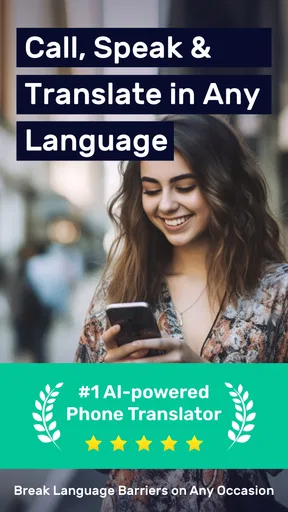
Ever found yourself in one of those awkward situations where you're staring blankly at someone speaking a language you just can’t wrap your head around? Well, you’re not alone. Enter AI Phone: Call & Voice Translator, a nifty little app that’s here to bridge the language gap, one conversation at a time.
What is AI Phone: Call & Voice Translator?
Alright, let’s dive right into the nitty-gritty. AI Phone: Call & Voice Translator is designed to make communication seamless across different languages. Whether you're traveling, doing business overseas, or just making new friends, this app promises to make your life a whole lot easier. What's more, it’s available on both Android and iOS, so no one’s left out of the party!
Getting Started
First things first, downloading the app is a breeze. Head over to the Google Play Store or Apple’s App Store, hit download, and you’re good to go. Once installed, the app greets you with a clean, user-friendly interface that’s as intuitive as it gets. Even if you’re not a tech whiz, you’ll find navigating through the app a piece of cake.
Features You’ll Love
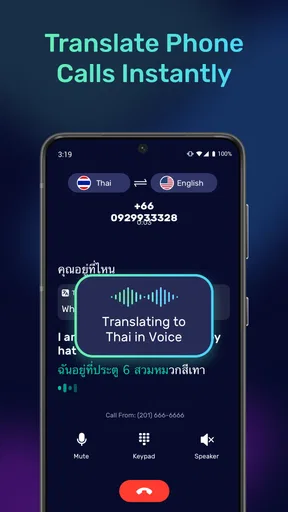
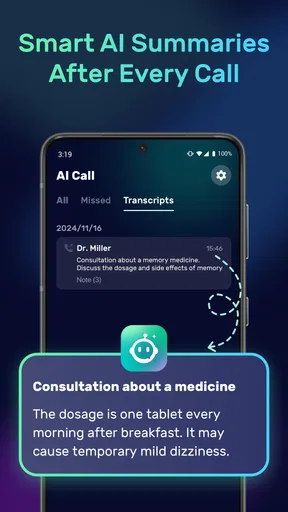
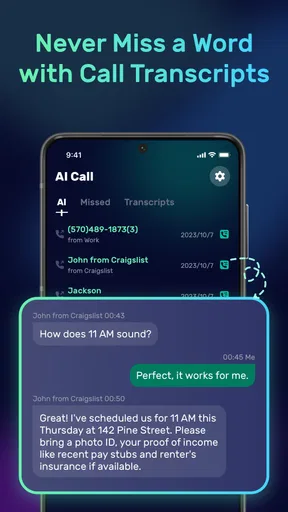
Let’s talk features, because this app is packed with them. Imagine being able to make phone calls to someone speaking a different language and having real-time translation at your fingertips. Yes, it’s as cool as it sounds. The app supports a wide variety of languages, making it a versatile tool for globetrotters and business professionals alike.
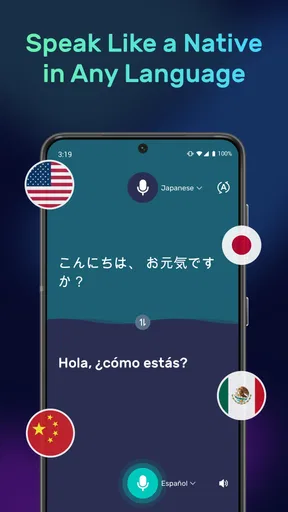
Another standout feature is its voice translation capability. You simply speak into your phone, and it translates your words almost instantly. It’s like having your own personal interpreter right in your pocket. The accuracy is pretty impressive, especially considering the complexities of language nuances.
Real-World Application
So, how does this translate (pun intended) into real life? Picture this: You’re in a bustling market in Tokyo, trying to haggle over a beautiful kimono. But there’s one tiny problem—you don’t speak Japanese. Whip out your phone, open the app, and voila! You’re negotiating like a pro.
Or perhaps you’re on a conference call with international clients. The app ensures that nothing gets lost in translation, literally. It’s like having a safety net for your conversations, ensuring clarity and understanding across the board.
User Experience
Now, let’s chat about user experience because, honestly, that’s where this app shines. The developers have really honed in on making sure the app is not only functional but also enjoyable to use. The interface is sleek, the transitions are smooth, and the app doesn’t lag, which is a huge plus in my book.
Furthermore, if you’re worried about privacy, the app has got you covered. It encrypts your conversations to ensure that your data remains secure, so you can chat away without any worries.
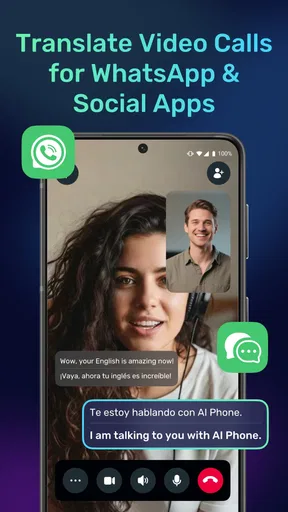
For calls connected through WhatsApp or other social apps, I’d think about the other person’s setup too. A translation aid is only useful if the exchange still sounds natural enough for both sides to respond. I’d let the other person know what I’m doing, speak one thought at a time, and avoid talking over their reply. That may feel slower than an ordinary call, but it is usually a better trade than trying to rush through a sentence and then untangle a misunderstanding.
How it differs from a text translator
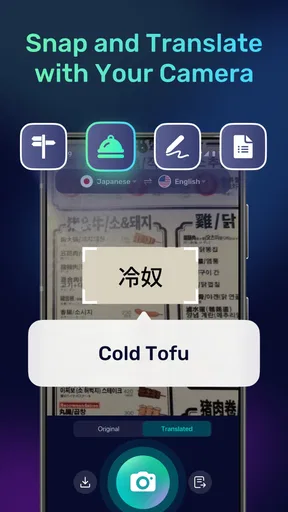
The choice between this and a standard translator depends on the job. If I am standing in front of a sign, menu, or message, text translation is often the simpler route: I can read the result at my own pace and check the original wording again. AI Phone is aimed at live speech and calls, where taking turns and keeping the conversation moving matters more. It is not automatically better; it is better suited to a spoken exchange.
That distinction helps avoid a common frustration. I would not open a call-focused tool just to translate a paragraph that can be copied into a text translator, nor would I expect a written translation app to make a phone conversation feel effortless. When I need to resolve a short spoken question—such as confirming where to meet—the voice-first approach has a clearer purpose. When the answer needs careful review, written text gives me more time to inspect it.
Small habits that make live translation easier
One useful approach is to prepare the key nouns before calling: a person’s name, a street or business name, and any essential number. Names and addresses are easy to mishear or render awkwardly, and they are often the details that matter most. I would say them slowly, then ask the other person to repeat or confirm them rather than assuming the translated exchange preserved every sound correctly.
For a longer conversation, I’d also keep each turn focused on one question or decision. Instead of explaining a whole situation in one breath, I’d give the background briefly, pause, and then ask what I need to know. This is not a special setting; it is a practical way to reduce ambiguity in any speech translation. It also makes it easier to notice when the response seems unrelated and ask for clarification right away.
Costs, age, and household expectations
The app is free to install, with optional in-app purchases listed from $2.99 to $99.99 per item. I would check the purchase screen carefully before relying on a particular feature or making a longer-term plan, especially if several people use one device. A child or guest should not be left to make purchase decisions on a shared phone; the adult who manages the device can decide whether any paid option is appropriate.
It is rated for Everyone, which speaks to its general audience classification, not to whether every translated conversation is suitable for a child to handle alone. I would keep an adult involved when the call concerns a child’s appointment, travel arrangements, or personal information. There is no need to assume the app provides family controls; ordinary household rules about who answers, who listens, and who may make purchases are still important.
AI Phone is developed by AI Phone, and it has an average rating of 4.5 from around 73,000 ratings, with more than a million installs. It was released on November 18, 2023, and version 3.25.0 is the current version. Those figures suggest it has found a substantial audience, but popularity cannot tell me whether a particular language pair or noisy call will work well for my needs. I’d test it with a simple exchange before counting on it for an important conversation.
As a communication app, its central promise is straightforward: help people speak across language differences through voice and calls, including use with WhatsApp and social apps. That focus is useful, but it also means the quality of the experience depends on the conversation itself—clear speech, a workable connection, and both people allowing time for translation. I would not choose it for offline sightseeing notes or as a complete language course; those are different tasks and deserve tools designed around them.
Final Thoughts
In a world that’s more connected than ever, AI Phone: Call & Voice Translator stands out as a must-have tool. It’s like having a universal language pass, breaking down barriers and making communication as seamless as it should be. Whether you’re a frequent traveler, a business professional, or just someone looking to connect with people from different cultures, this app is a game-changer.
So, if you’re ready to make language barriers a thing of the past, give this app a whirl. It’s user-friendly, efficient, and just the right companion for your international adventures.
Happy translating!
My household verdict
For shared use, I’d recommend it when an adult is present, the conversation is ordinary, and everyone understands that translation can need clarification. Its value is less about making every call perfect and more about giving people a way to begin a conversation they might otherwise avoid. That can be a meaningful help when arranging a visit, checking a delivery detail, or keeping in touch with someone who speaks another language.
I would not make it the default for every family call. If the conversation is sensitive, consequential, or too difficult to verify, a human interpreter or a carefully written exchange is the safer choice. If you do try it, start with a low-pressure call, agree who is responsible for the conversation and any purchases, and repeat the important outcome before hanging up. With those boundaries, AI Phone can be a practical household communication aid rather than something everyone is expected to trust blindly.
Verdict
Strengths of AI Phone:Call&Voice Translator
- Accurate voice recognition capabilities.
- Supports multiple languages for translation.
- User-friendly interface enhances usability.
- Real-time translation during calls.
- Secure and private data handling.
Limitations of AI Phone:Call&Voice Translator
- Limited offline functionality.
- Subscription required for premium features.
- Occasional lag in translation speed.
- Not all dialects are supported.
- May consume significant battery life.
Other Releases by AI Phone Call
View All
Spam Calls Blocker for Android
Communication4.4
Similar Picks in This Category
View All
Google Messages
Google LLC4.6

Gmail
Google LLC4.1

Google Meet
Google LLC4.4

Google Chrome
Google LLC4.1

WhatsApp Messenger
WhatsApp LLC4.6

Carrier Services
Google LLC4.2
Frequently Asked Questions
How accurate is the translation provided by AI Phone: Call&Voice Translator?
AI Phone: Call&Voice Translator uses advanced machine learning algorithms to deliver high accuracy levels in translations. However, the accuracy may vary depending on the complexity of the language and the clarity of the audio input. Regular updates and user feedback help enhance its precision over time.
Does AI Phone: Call&Voice Translator support real-time translation during calls?
Yes, AI Phone: Call&Voice Translator supports real-time translation during calls. This feature allows users to communicate seamlessly across different languages, making it ideal for business calls and international conversations. Users should ensure they have a stable internet connection for the best experience.
What languages are supported by AI Phone: Call&Voice Translator?
AI Phone: Call&Voice Translator supports a wide range of languages, including major ones like English, Spanish, French, Mandarin, and more. The app continuously updates its language database, so users are encouraged to check the app for the latest list of supported languages.
Is AI Phone: Call&Voice Translator secure to use for confidential conversations?
AI Phone: Call&Voice Translator prioritizes user privacy and employs encryption to protect conversations. However, users should be cautious and avoid sharing highly sensitive information over any digital platform. Reviewing the app's privacy policy can provide additional insights into its security measures.
Are there any subscription fees or in-app purchases in AI Phone: Call&Voice Translator?
AI Phone: Call&Voice Translator offers both free and premium versions. The free version includes basic features with limited translation minutes, while the premium version, available through a subscription, offers unlimited access and additional features. Users can choose based on their usage needs.
